Quick answer (dated Oct 3, 2026): Claude Cowork is no longer laptop-only. It’s rolling out on web and mobile (beta) so tasks follow your account. On Pro and Max, starting October 6, 2026, new Cowork tasks run in the cloud — Anthropic is removing the “Only on your computer” setting. Old local tasks keep running where they started. Desktop still matters for local files, browser use, and computer use.
Skip this if you’re on Free Claude — Cowork is a paid-plan feature. Keep reading if you use Pro/Max and you’ve been treating Cowork like a desktop-only agent.
What Anthropic is shipping
Anthropic’s product post frames it simply: Cowork on web and mobile so sessions and files go where you go. Start at the desk, check from your phone, keep going when the laptop sleeps. Scheduled tasks can run with no device online. When Claude needs a decision only you can make, the question can reach your phone.
Help Center details matter more than the launch poetry:
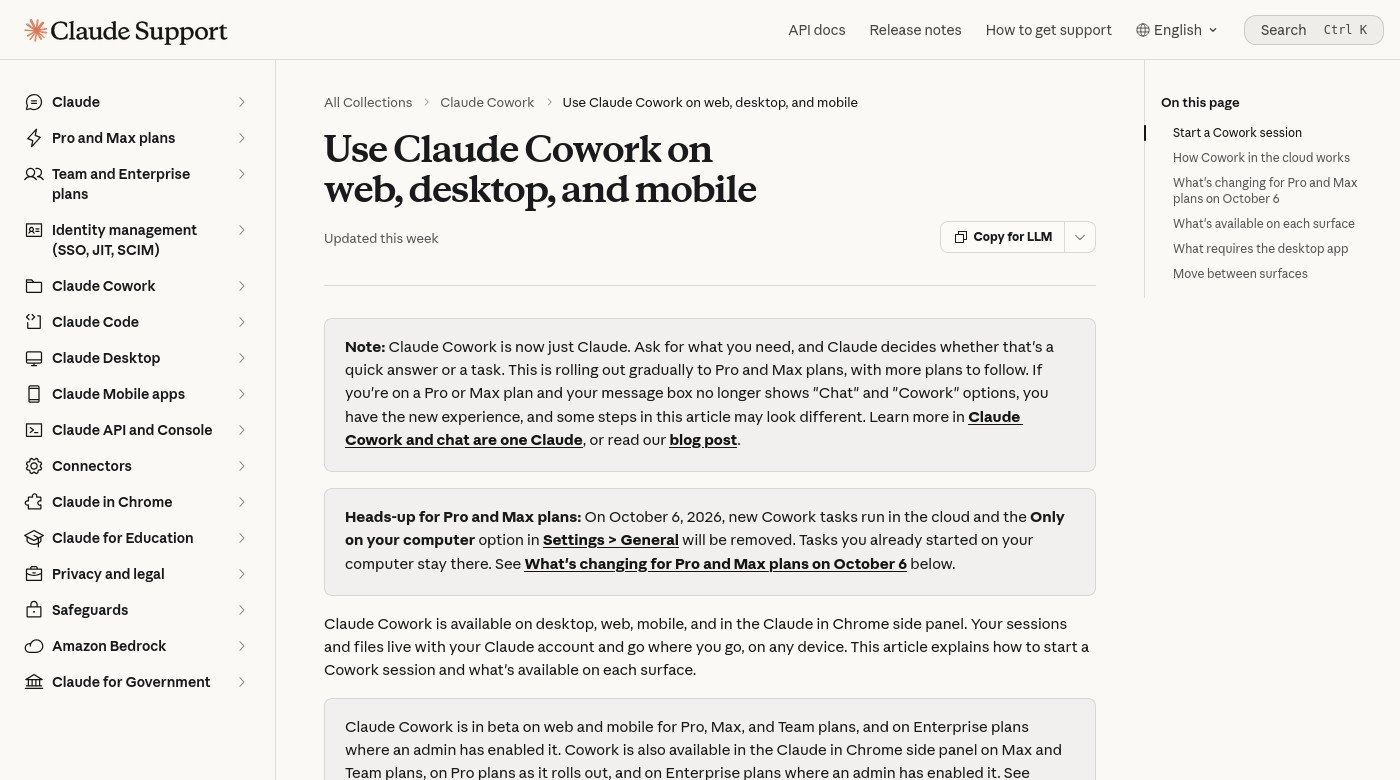
On October 6, 2026, new Cowork tasks on Pro and Max plans run in the cloud. The Only on your computer option in Settings → General will be removed… Tasks you already started on your computer stay there.
— Claude Help

Who gets what (right now)
| Surface | Who (Help) | What it’s for |
|---|---|---|
| Desktop app | Paid plans | Full Cowork — local files, browser use, computer use |
| Web (claude.ai) | Pro, Max, Team (Enterprise if admin enables) | Beta cloud sessions; start/steer/review from Home |
| Mobile apps | Pro, Max, Team (Enterprise if admin enables) | Beta — update the app if you don’t see Cowork |
| Claude in Chrome | Max/Team; Pro rolling out; Enterprise if enabled | Side panel starts a Cowork session |
Chat and Cowork increasingly share one home. On some Pro/Max accounts, Anthropic is rolling out an experience where there’s no separate Cowork toggle — you describe the task and Claude decides. If your UI still shows Chat vs Cowork, select Cowork in the message box.
The Oct 6 change (Pro / Max)
If you liked “Only on your computer,” mark the calendar:
- New Cowork tasks → cloud
- That local-only toggle → gone
- Tasks you already started locally → stay local until finished (Help notes a transcript download path if you want to continue work elsewhere)
- Your folders stay on your machine; Claude reaches connected folders through the desktop app while it’s open. For cloud work it can fetch copies of needed files; deleting a session deletes those copies per Anthropic’s retention practices
- Whether chats improve models still follows Settings → Privacy (“Help improve our AI models”)
If you need work to stay on one machine: Help points you to Claude Code in the desktop app for local folders/history — not as a silent continuation of every Cowork setting. Projects and scheduled tasks don’t magically carry over.
What still needs the desktop app
Cloud session ≠ “Claude can see your whole disk from your phone.” Help is clear that these still need Desktop open (even when the session runs in the cloud):
- Local file access (folders you’ve connected)
- Local connectors / local MCP plugins
- Browser use (built-in desktop browser or Claude in Chrome)
- Computer use (screen control — beta on Pro/Max)
Rule of thumb I use: phone/web to steer and review; desktop when the task touches your machine.
What I’d actually try this week
- Update Claude mobile + desktop.
- Start a non-sensitive multi-step task on desktop (research brief, deck outline from notes you don’t mind in the cloud).
- Close the laptop, open the same session on your phone, answer one clarifying question.
- Before Oct 6: if you have local-only habits, finish or export those tasks; don’t discover the toggle is gone mid-project.
- For money, outbound email, or private folders — stay on Manual approvals; don’t “Skip all approvals” to feel productive.
Outcome: [what done looks like]
Sources: [folders / links / threads I can share]
Constraints: don’t send email; don’t delete files; flag anything unverified
Deliverable: [doc / sheet / bullets]
Stop and ask me before: [anything irreversible]
FAQ
Is Cowork free?
No. Help lists paid plans only (Pro, Max, Team, Enterprise with admin gates).
Does web/mobile replace desktop?
No. Desktop remains the full local-files + browser + computer-use surface.
Will my Oct 5 local task break on Oct 6?
Help says tasks already started on your computer stay there. New tasks after the change run in the cloud.
Is cloud Cowork safe for work docs?
Treat it like any cloud agent: assume Anthropic’s servers see what the task needs. Use Privacy settings deliberately; don’t connect folders you wouldn’t upload. See also paste hygiene.
How is this different from ChatGPT “Work”?
Different vendors, different meters, different connectors. Same human job: hand off multi-step work, then review. If you’re picking a stack, start with which chat you already finish work in.
What I’d do next
- If you’re Pro/Max: try one cloud-friendly Cowork task before Oct 6 so the change isn’t a surprise.
- Keep desktop installed for anything that needs local files.
- Wire Cowork into a weekly loop — research → draft → edit — instead of one-off magic demos.
Read next: Weekly AI workflow · AI without pasting private data · GPT-6 Astra access
Sources
- Anthropic — Claude Cowork on web and mobile
- Claude Help — Use Claude Cowork on web, desktop, and mobile
- Claude Help — Get started with Claude Cowork
Leave a Reply